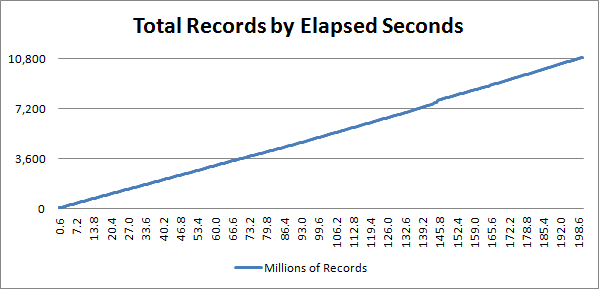
When you ask most people why using a GUID column for a primary key in a database might be slower than auto-incremented number the answer your likely to get is usually along these lines:
“Guids are 16 bytes, and integers are only 4 bytes.”
While this information is technically accurate, it is completely the wrong answer to the question. The performance delta from a 16 byte key to a 4 byte key is most likely negligible and almost certainly impossible to accurately measure. To understand what is wrong with a guid, you first need to know a little about how a database stores it’s data.
The most common storage used by databases (to the best of my knowledge) is a B+Tree. They offer great performance even for very large sets of data. They do however suffer from one problem, let’s call this ‘key density‘.
By key density I’m referring to the density, or close proximity, of the keys being accessed at any given moment as it compares the universe of all the keys in storage. For example let’s say I have 10 million records, each keyed by a unique integer numbered from 1 to 10,000,000. I can say that keys {44,46,52} have a high-density, whereas keys {100,10553,733555} have a very low-density.
Cache is everything. When a database needs to read or write a record, they traverse nodes in the tree and read them into memory from disk. Disk IO is the single biggest time expense a database has. So to reduce the number of reads, nodes visited while fetching or writing a record are usually cached. This allows more efficient retrieval of the record next time it is requested. As more low-density keys are accessed, more and more unique nodes are fetched from disk into memory and cache. Yet every cache has its limits, bound primarily by the hardware available and often by software configuration. Once the available cache space has been used, stale/old nodes are removed from cache to make room for newer ones.
So now let us imagine how this applies when using a auto-numbered field. To insert the next new row I’ll need to travel down the right-edge (highest key values) of the tree. Once at the leaf, insert and done (oversimplified). Since the next write uses the next possible key from the last one used, it is practically guaranteed to find the nodes it needs in cache. So a few quick memory look-ups later the record can be inserted without reading from disk. It should now be obvious why Guids will have problems…
Creating a new Guid is essentially done by taking a value ‘uniformly at random’ from the entire range of possible Guid values. That means that unlike our auto-number field with a high key-density, our Guid keys are designed to be sparse, or to have a low key-density. Because of this for two Guid values to be stored in the same tree node is likely going to be statistically more improbable than winning the lottery. Using a Guid as a primary key practically obliterates the ability for a database to reliably find nodes in the cache based upon previous queries. By the time the database has passed about 10 million rows your performance will fall drastically.
Want more proof? Read the Guid article on Wikipedia under the section “Sequential algorithms” it discusses this very topic. It also discusses solutions to this, as first introduced by Jimmy Nilsson in 2002, called a COMB Guid or Combined Guid for the combination of a timestamp.
So are Guid’s Evil in a Database? No. It’s the algorithm that generates the Guid that is the issue, not the Guid itself. As mentioned in the articles linked above, there are other algorithms. There are numerous possibilities documented online. I’ve implemented one of these that out-performs the native Guid.NewGuid() implementation that will be released in the next few weeks. Until then, this is fairly similar to the algorithm I’m using…
static class SequentialGuidGenerator
{
    static int _sequenced = (int)DateTime.UtcNow.Ticks;

    private static readonly System.Security.Cryptography.RNGCryptoServiceProvider _random =
        new System.Security.Cryptography.RNGCryptoServiceProvider();
    private static readonly byte[] _buffer = new byte[6];

    public static Guid NewGuid()
    {
        long ticks = DateTime.UtcNow.Ticks;
        int sequenceNum = System.Threading.Interlocked.Increment(ref _sequenced);
        lock (_buffer)
        {
            _random.GetBytes(_buffer);
            return new Guid(
                (int) (ticks >> 32), (short) (ticks >> 16), (short) ticks,
                (byte) (sequenceNum >> 8), (byte) sequenceNum,
                _buffer[0], _buffer[1], _buffer[2], _buffer[3], _buffer[4], _buffer[5]
                );
        }
    }
}
The problem with this code is that not all databases compare Guids the same way, or in the same format. So you should be cautious about using this approach until you understand your database and how it stores and compares a Guid type.
Lessons Learned and Applied Concept
The interesting and rather undocumented aspect about this issue is that it applies just as well across all types of composite keys. Let’s take an example, we have a simple logging structure we are writing to with NLog in a database. The rows are identified by a Guid, but we almost never query these records by Id. Most of the time when we query this data we are looking within a range of dates for a specific event. How would you model the primary key and indexes? Well most people want to use as small of a primary key as possible and so the natural assumption is to use the ID of the record. This, as we’ve already covered, is generally a bad idea just because we are using Guids, but even more because our queries will be time based. By promoting the timestamp into the primary key we not only gain better query performance, but we also remove the problem of the GUID identifier. Let’s see the example:
TABLE LogFile {
    Column DateTime timestamp,
    Column GUID id,
    Column int eventType,
    Column string message,
    Primary Key ( timestamp, id )
}
With the primary key using the timestamp as it’s first comparison we will always be writing to the same area within the table and will consistently hit the cache for writes. When seeking for data the timestamp will group all the records needed together so that the data we are after is stored as dense as is possible requiring the fewest possible reads.
Now let’s drift this example a little to a new scenario. Let’s say the log above is being written from an ASP.NET application in which all users are authenticated. We want to add this user identity to the LogFile data being written, and we want to constrain queries to be associated with a user. In the example above it may be safe to simply modify the Primary Key ( timestamp, id ), to include the user as first key. Thus the Primary Key ( userId, timestamp, id ) will now perform well for a single user right? Well the answer Yes and No. It really depends greatly on the application. Introducing userId as the primary key means that we could be writing to as many places in the file as we have users. If the application is a mobile app polling our web server every minute, then we’ve just scattered our writes across all N thousands of users in our system. Yet if our application requires a human being to use a web browser or mobile app, the number of active writing points in the file drops considerably… Well at least until your Facebook and at that point you cash out and go home :)
One last example. Given you are building SkyDrive, or GDrive, or whatever you want to store the following entities: Customer, Drive, Folder, File. Each entity is identified by a GUID. What does the File’s primary key look like? Well I’d probably key the File by (CustomerID, DriveID, FolderID, Timestamp, FileID). You would obviously need an ancillary index by FileID in order to access the file directly. Food for thought anyway…
The reason I bring all this up is that there is no rule of thumb for a good primary key. Each application will have different needs and different requirements. Want you should take away is that the density of keys being written to in that first field of your primary key will ultimately dictate your write throughput and likely your scalability. Be conscious of this, and choose keys wisely. The Guid ID of a record is not always the best answer for a primary key.
As a side-note, using Guid’s as a primary key in the B+Tree will work but much more slowly at large volumes (2+ million). Using a sequential guid generator like the one above, or using an ordered natural key (like a qualified file name) will serve you much better. Ordered (or near-ordered) keys will provide linear scalability whereas unique random GUIDs will start to suffer once you’ve exceeded the cache space.